
A hotel confirmation in email, a flight ticket in your photo library and a tour ticket in a chat can be hard to find at the moment you need them. Tripop brings booking PDFs and photos into one trip, with AI results that you review and save.
First decide whether to store documents, add events to an existing trip or create a new trip. The input methods and saving steps differ.
1. Choose the right workflow
| What you want to do | Mobile app | Web |
|---|---|---|
| Add vouchers with AI to an existing trip | Analyze up to 10 files at once; review whether to attach them to existing vouchers or create new ones | AI autofill analyzes 1 file at a time; review and edit the populated form |
| Add events to an existing trip | Use Add with AI in the schedule to analyze PDFs or photos; review the preview, then add to the existing trip | Enter text through the schedule’s AI addition form; submitting analyzes and saves it to the existing trip |
| Create a new AI trip from bookings | Up to 30 files; review a draft itinerary and vouchers | Up to 10 files; review the draft, then save |
| Organize vouchers without AI | Choose manual entry and save a title, date and attachments | Fill in the voucher form manually; up to 10 attachments |
Use PDF, JPEG, PNG, WebP or HEIC files, no more than 20 MB per file. These counts apply to the selected workflow, not the total number of vouchers in a trip. AI analysis requires sign-in, an internet connection and points; points are deducted according to usage. Starting a new AI trip requires a balance of at least 80 points; the actual deduction is calculated from processing usage. Manual entry does not require running AI analysis.
2. Prepare originals you can check
Choose documents with readable traveler details, booking dates and references. AI extracts a title, category, date, booking reference and detailed notes, but unclear text or missing pages can lead to mistakes.
| Document | Compare these details with the original |
|---|---|
| Flight ticket | Flight number, local departure and arrival dates and times, airports, terminals, seat and baggage conditions |
| Hotel confirmation | Property name and address, check-in and check-out dates and times, booking reference and breakfast conditions |
| Tour or admission ticket | Visit date, meeting point and time, timed-entry slots and guide contact |
| Train or bus reservation | Departure and arrival stations, date and time, service number and seat |
Check these details when they appear in the original. A theme park admission ticket and an Express Pass for the same day may be separate products: check that both files and their timed entries remain distinct. Keep originals alongside translated notes so you can refer to the actual booking conditions.
3. Add vouchers to an existing trip
On mobile, open the trip's voucher list, tap add and choose AI analysis or manual entry. After selecting photos or PDFs for AI analysis, review whether each result will attach a file to an existing voucher or create a new voucher, then confirm the batch. This preview does not let you edit individual fields. After saving, the mobile voucher editor lets you change the title, category, date, booking reference and notes.
On the web, use AI autofill in the trip's add-voucher form to analyze one file. Compare the populated fields with the original, edit the form and save. A voucher can have up to 10 regular attachments. To change voucher fields after saving on the web, use the mobile app's voucher editor.
Adding a voucher does not create a new itinerary. Mobile may link a new voucher to an existing event on the same date, so check that the event actually matches the reservation. The web's regular add-voucher form does not automatically link it to an event.
To add itinerary events from documents to an existing trip, choose Add with AI in the mobile schedule. Review the PDF or photo analysis preview and press Add to Schedule; you do not need to create another trip. The web’s AI addition to an existing schedule takes text, then analyzes and saves it when submitted, so check your input before running it.
4. Create a new trip from booking documents
If you have not created a trip yet, you can upload flight, hotel and tour confirmations together through AI trip creation. It drafts dated events and vouchers from the bookings; it is not a promise to fill every unbooked hour with a complete sightseeing route.
- Select your files in AI trip creation and start the analysis.
- Compare the trip dates, daily events and vouchers in the preview with the originals. Analysis finishing does not mean the trip has been saved.
- Press the confirmation or save button to create the trip. The preview is read-only; make detailed changes in the relevant editing screens after saving.
- Open the saved vouchers and check their original files, event dates and times, and document links.
Uploading, analysis and final saving are separate steps. Review the result again if you change the files and rerun analysis. The getting-started guide shows the trip-creation screens.
Example: what remained from five booking documents
These are synthetic booking samples, not valid reservations or admission tickets. On September 9, 2026, we analyzed the five files once with the prompt used for Tripop document analysis and Gemini 2.5 Flash. The result contained four itinerary days and five vouchers. Open the originals below to compare them.
| Original input | Information retained in this result | What to check |
|---|---|---|
| Flight image | October 8, departure 09:20 and arrival 11:05 | Local dates, times and flight number against the original |
| Hotel PDF | Check-in October 8 at 15:00; check-out October 11 at 11:00 | Both hotel events and the associated original file |
| USJ admission image | A separate admission voucher for October 9 | That it remains separate from the Express Pass |
| Express Pass PDF | Timed entries at 10:30 and 14:00 in the itinerary | Times in the events and original, not just the voucher title |
| Restaurant booking image | October 10 at 18:30, plus an Other-category voucher | Booking reference, time and restaurant name |
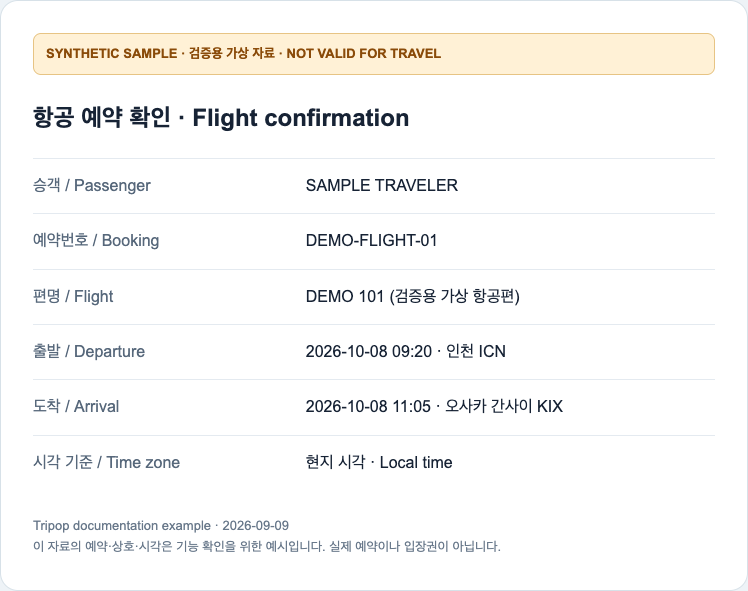
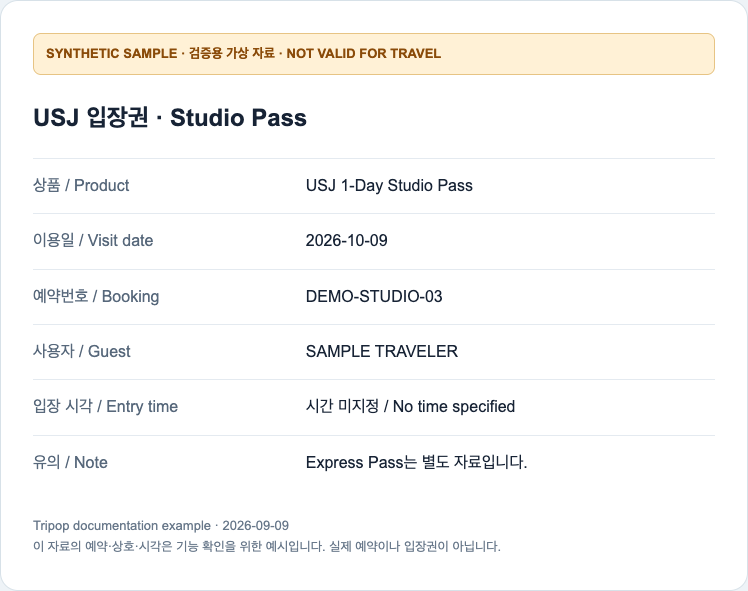
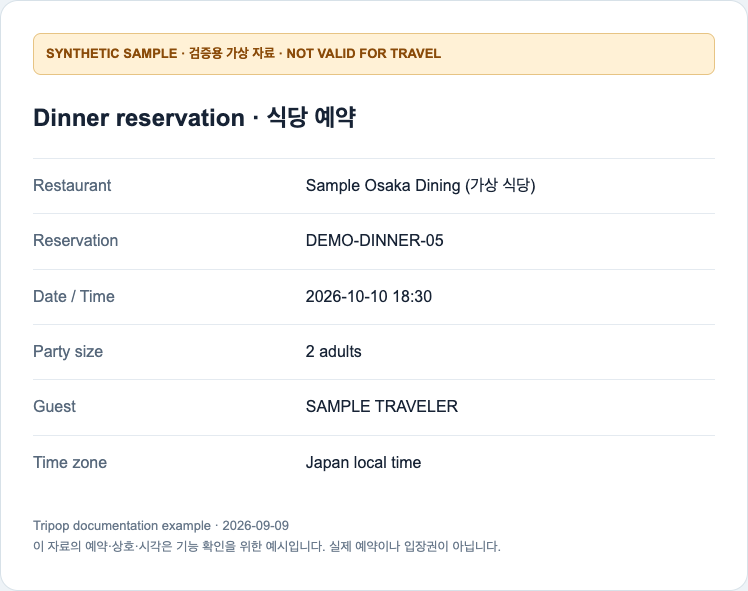
All five booking references remained in voucher notes, and each voucher identified the correct source file. The result also added an airport-to-hotel transfer and several free-time events that were absent from the originals. Do not treat these as confirmed bookings: review whether you need them and correct their timing.
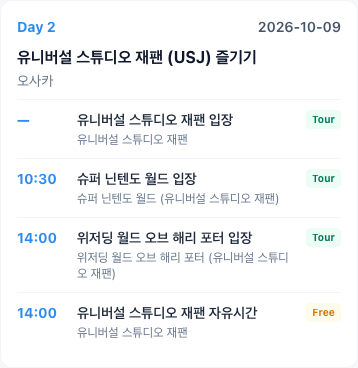
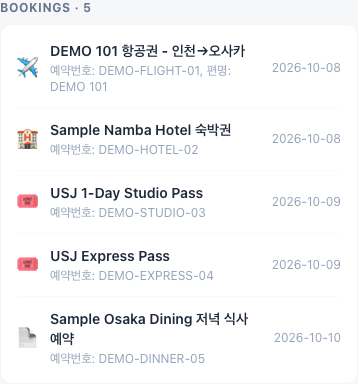
One analysis is not an accuracy rate for documents in general. This example also does not demonstrate a completed in-app upload, save or offline viewing session. Check those stages separately using the steps below.
5. Make saved vouchers easy to find
The seven categories are Flight, Hotel, Tour, Transport, Visa / Entry, Insurance and Other. Filter the list by category or search by title to find a hotel confirmation or tour ticket. A restaurant booking can go in Other; a title with the venue and reservation time helps distinguish it.
On mobile, edit an itinerary event to select or deselect its vouchers. You can link several vouchers to one event. A shared date does not prove that a document belongs to that event, so open the linked originals when flights, hotels and restaurants fall on the same day.
Attaching a changed booking document is different from updating its details. Even if a new file is added to an existing voucher, compare the date, time and notes with the latest confirmation instead of assuming they were updated automatically.
6. Download originals on mobile before departure
Mobile offline viewing works when the original file is actually stored on that device. A voucher created elsewhere or added by a companion may appear in your list while its file still needs downloading.
- Open the trip's mobile voucher list while online.
- If a download banner appears above the list, run it. The banner disappears when there are no remaining remote files to download.
- Open the flight, hotel and tour originals you need, then try opening them again in airplane mode before you leave.
An absent banner alone does not prove that every required original is present. Check each new phone and each companion's device separately. Use the web voucher pages with an internet connection. AI analysis and downloading originals you do not yet have also require going online.
Share the documents with companions
After accepting a trip invitation and signing in, companions can view synchronized vouchers in the app or on the web. Sending the website address alone does not grant access to a private trip; make sure they have joined the trip.
Check which traveler details and other people's reservations are included before sharing a document. Companions should download the tickets they will need onto their own mobile devices too.
FAQ
What if AI reads a date or booking reference incorrectly?
The web's regular voucher AI autofill lets you edit the form before saving. Mobile AI results and new-trip previews are reviewed and saved first; correct them afterward in the mobile voucher editor or itinerary editor. Compare your corrections with the original.
Can I add a new or changed booking during the trip?
Yes, use voucher addition in the existing trip. AI analysis and remote uploads require an internet connection. After attaching a changed document, check the date, time, booking reference and linked itinerary yourself.
Can a companion view vouchers without installing the app?
A companion who has joined the trip can sign in on the web to view synchronized vouchers. Web access requires an internet connection. Sharing the website address alone does not grant trip access.
Start with one booking on the web, or use the iPhone app or Android app to prepare originals for your trip.